Waterfall templates are reusable structures that define how distributions flow through tiers. Instead of building a waterfall from scratch for every asset, you can select a template, and it will pre-configure your tiers, rates, splits, and class rules. Templates save time and ensure consistency across your portfolio.
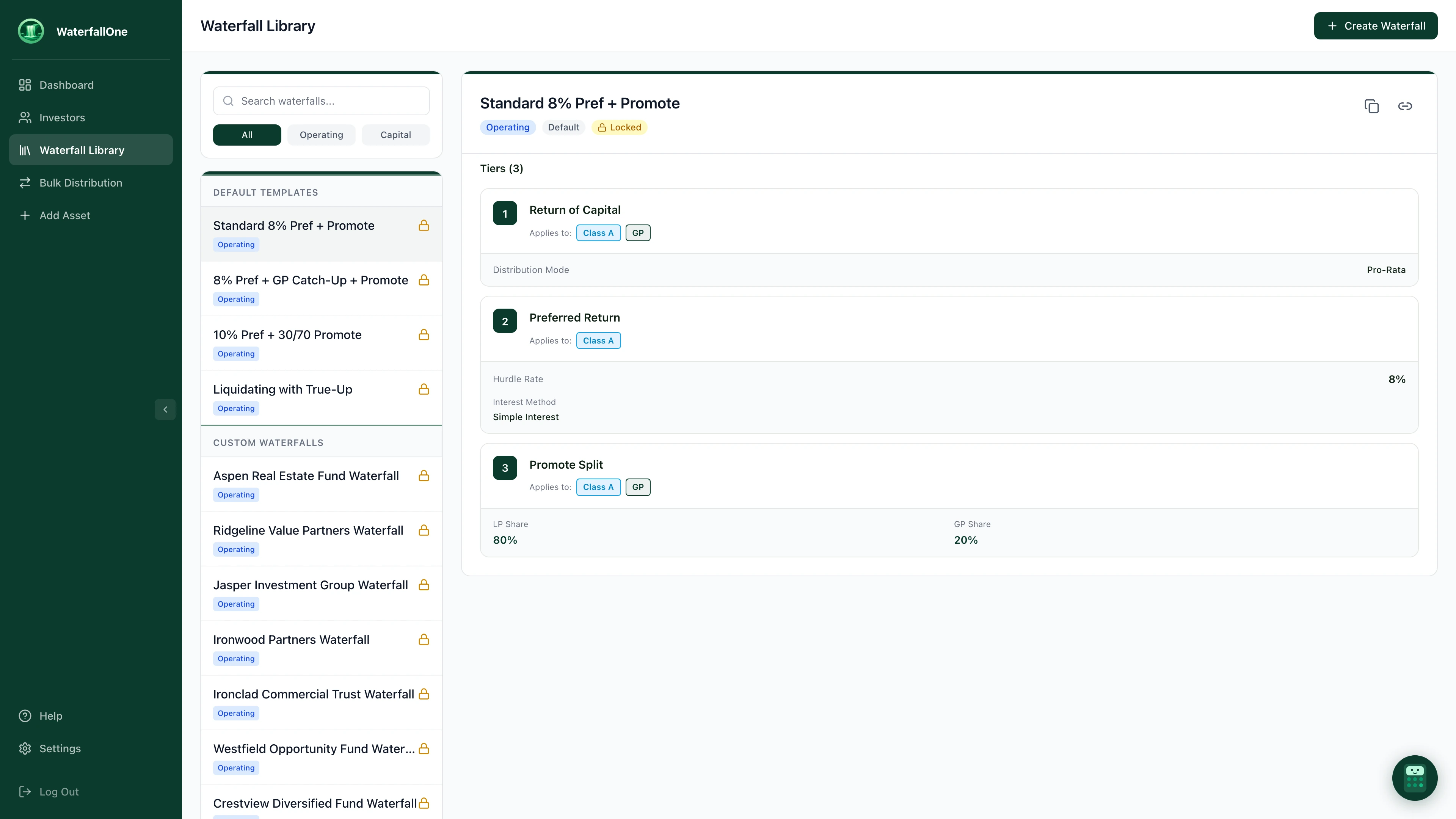
The Waterfall Library. Select a template to preview its tiers, or create a new waterfall from scratch.
System Templates
WaterfallOne comes with a library of pre-built templates that cover common fund structures:
- Simple 2-Tier: Return of Capital → 80/20 Split. The most straightforward structure — capital comes back first, then profits split between GP and LPs.
- Standard 3-Tier: ROC → 8% Preferred Return → 80/20 Split. The workhorse for most real estate and PE funds.
- Standard 4-Tier with Catch-Up: ROC → 8% Preferred Return → Catch-Up → 80/20 Split, allowing the GP to "catch up" on preferred return before the final split.
- Multi-Hurdle Promote: ROC → 8% Preferred Return → 1.5x → 2.0x → Split. Designed for funds with multiple IRR or equity multiple hurdles that shift the promote at each stage.
These are the four system templates included with every account. Beyond these, you can build fully custom waterfall configurations with your own tiers, rates, class rules, and fee structures — then save them as reusable templates in your library.
Creating Custom Templates
If your fund's waterfall structure is unique, you can create a custom template:
- Configure a waterfall for an asset with your preferred tiers, rates, and class rules.
- Once it's set up correctly, save it as a template.
- Name and optionally describe the template (e.g., "2026 Fund – Diversity Class Structure").
- The template is now available in your library and can be applied to future assets.
Custom templates are organization-specific and can be duplicated and modified as your fund strategy evolves.
Using Templates During Asset Creation
When you click Add Asset, the setup flow includes a Select Waterfall step where you pick a system template, one of your saved custom templates, or build from scratch. Instead of configuring tiers manually, you can:
- Select a system template or one of your custom templates from the dropdown.
- The template's tiers, rates, and class rules are applied instantly.
- Review and adjust if needed (e.g., change the preferred return rate for this specific asset).
- Activate the waterfall and start distributing.
Templates vs. Active Waterfalls
It's important to understand the distinction:
- A template is a starting point: a reusable blueprint stored in your library.
- An active waterfall is what's assigned to a specific asset. Once distributions have been run against it, the waterfall becomes locked — you cannot edit it in place. To make changes, duplicate it and save as a new waterfall. Default system templates also cannot be edited directly; they can only be duplicated.
- You can create a template from an asset's waterfall, but the template and the active waterfall are separate entities.
Duplicating and Evolving Templates
As your fund grows, you may need to evolve your waterfall structure. You can:
- Clone an existing template to create a new variant.
- Adjust tiers, rates, or class rules for the new version.
- Save it with a new name (e.g., "2026 Fund – v2 with Fee Sharing").
- Apply the new template to future assets while keeping the old template for reference.
This approach maintains a clear audit trail of how your fund structure has evolved over time.
Ready to standardize your waterfalls?
Start free. No credit card required.